Reminders in your client’s name. Replies come back to you.
Every client’s QuickBooks, one list of what needs you, worst first. Nothing reaches their customers or their books unless you approved it or set it up.
- QuickBooks offPalmetto HVAC · Nothing syncs until Dana reconnects6days
- Reply from MarcusMarigold Salon · “Can I pay Friday?”$860
- Receipts to matchShell $96.40 and 2 more3
- Quiet bank feedNo activity on Chase checking16days
- Uncategorized chargesUp 13 this week22

- First client free, forever
- $15 a client after
- Everything on
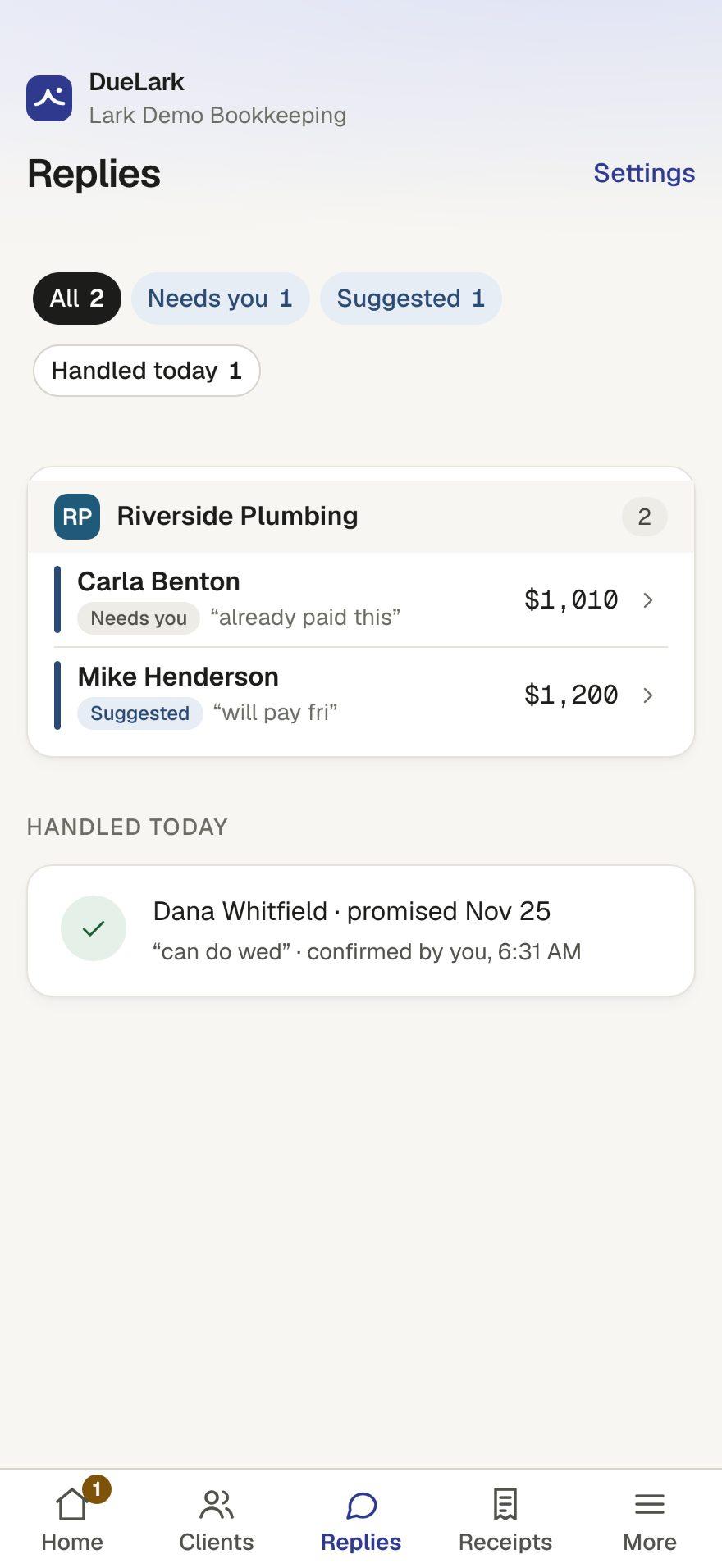
You stay in control.
Turn on review and see every reminder before it goes.
Pause one customer, not all of them.
Reminders stop the moment they pay, and a reply pauses everything.
Every change in your books is listed, with who did it and an Undo.
Six things every client is slow to do. DueLark asks, you decide.
Paid faster
Friendly reminders in your client’s name with a pay link. Replies land with you.
Receipts, attached
DueLark asks whoever used the card, reads the receipt, and attaches it in QuickBooks.
“What was this?”
Uncategorized charge? DueLark asks the owner from their phone and writes the answer back.
Books that watch themselves
Quiet feeds, missed payroll, duplicates, bills past due, cash short this week. 29 checks, one line each.
W-9s in January
Your vendor signs from their phone. No account, no daily nagging, one list of who’s still missing.
How W-9s workA short close
A few steps per client per month, the close date set in QuickBooks when you say so.
Receipts you didn’t have to chase
Charges over your threshold with no receipt get asked of whoever used the card, then attached. Lost? A signed statement.
How receipt follow-up works29 checks, every sync, and the list keeps growing
Run for every client. Each has its own threshold, and you can turn it off.
- 10Money coming in
- 9Money going out
- 7The books themselves
- 3Taxes and payroll
- QuickBooks off
- Quiet bank or card account
- Invoices never sent
- Bills due soon
- Likely duplicate
- Changed after the close
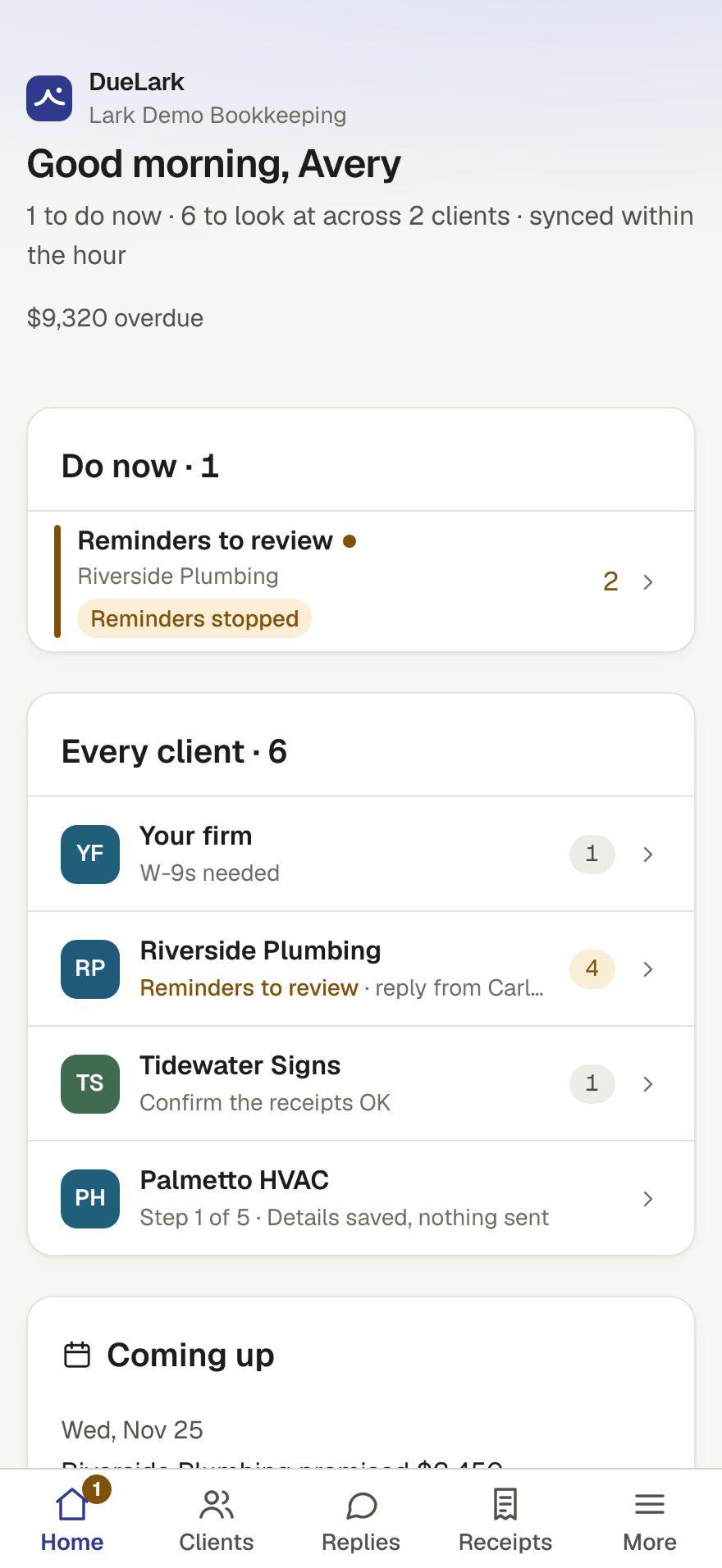
Connect each client once. Then look at one page.
- 1
Connect their QuickBooks
Send the owner a link, or connect it yourself. About five minutes.
- 2
DueLark watches and asks
When something needs a person, it asks the right one, in your client’s name.
- 3
You see one list
Home: what needs you, worst first. Books: who’s behind. Trends: what’s better.
Four numbers, month by month, per client or across all of them.
An example firm after a year. Yours come from your clients’ QuickBooks, two years back from the day you connect.
Their customers see them. Their owners see you.
Customers
Reminders carry the business’s name, logo and colors, and its own QuickBooks pay link. DueLark never appears.
Owners
Asks and reconnect links come from your firm. One tap, no sign-in, no app.
A new line on the invoice you already send.
Bill it as “receivables and receipts” or fold it into monthly bookkeeping. DueLark is a flat amount per client; what you charge is yours.
- Nothing for your client to install
- A few minutes a week in the reply queue
QuickBooks sends a reminder. DueLark follows through.
A customer replies “I already paid.”
DueLark looks in QuickBooks and pauses that invoice. Not there? You hear.
A customer says “Can I pay Friday?”
Reminders wait until Friday; a gentle nudge follows if it slips.
An owner has to answer something.
DueLark asks in your firm’s name: a receipt, a charge, a reconnect.
The owner wonders if it’s working.
A short weekly note from your firm: what came in, what’s open.
Keep QuickBooks for invoicing. We’ll help you switch its own reminders off, so customers hear from you once.
Two ways to pay. Both simple.
Your first client is free, forever, and so is your own business. After that, one price each. Every check on every file.
DueLark Solo
For the businesses you own.
Free
Your own business is free; $49 a year for each more.
DueLark for firms
For the businesses you keep books for.
Your first client is free, forever.
Free
A second client is $15 a month, its first month free.
- First client free
- each after that $12
- each past 15 $8
Only clients that are sending count; setting one up is free.
- Email reminders
- Sorted replies, automatic answers
- Receipts by email and upload
- Your whole team
Cancel anytime. Yearly plans renew once a year; clients you add midyear are prorated.
More than 40 clients? Talk to us
Already using QuickBooks’ reminders?
| QuickBooks’ reminders | DueLark’s |
|---|---|
| Email reminders[1] | By email, in your client’s name, with a pay link |
| The same reminders for every invoice[1] | Your schedule and your words |
| No switch for just one customer[2] | Pause anyone; stops when they pay |
Where do replies go?
To your Replies in DueLark, never your client’s inbox. Customers answer the reminder they got in your client’s name, and you see every client’s replies in one place. A promise to pay by a date is kept as a record, and the reminders hold off until then.
Does DueLark change my clients’ books?
Only what your firm chooses, each named in the Terms: attach a receipt, create an expense, apply a category, delete a duplicate you pick, file a W-9, set the close date. When a check flags something, its fix makes that one change, like a payee, a deposit or a void, with an Undo. Most need the client’s consent.
Can DueLark tell if an account isn’t reconciled?
QuickBooks doesn’t share that with apps. Your close checklist records it: tick “Reconciled” for each client each month, and see across all of them who’s closed.
What about bank feeds that break?
QuickBooks doesn’t tell apps that either. DueLark notices when an account goes quiet, and when you say so, asks the owner to check the feed. You see the message before it goes, and they can answer from the email.
Is this practice management?
No. It’s one short list of what needs a person across every client, and the asking. Your workflow tool stays your workflow tool.
Do I need a card to start?
Not for your first client, ever. From your second, the first month is free and we ask for a card when it ends.
More questions
How does pricing work?
Your first client is free, forever. Then per client that’s sending: $15 a month each up to 15, $10 each after that; yearly $12 and $8, billed once a year. No plans, everything included. You see the change before you add a client, and one you only watch is free.
Is there a client limit?
Your first client is free, forever, and each client after it is billed per client. The listed price covers up to 40 clients; past that, we agree a price with you.
Does DueLark hold the money?
No. The reminder’s pay link is the invoice’s own QuickBooks payment page, so the money goes where it always does. DueLark never touches a payment.
Can I leave some customers out?
Yes. Pause anyone for a while, or set them to never be contacted. It sticks through payments and new invoices until you change it.
Does it work with Xero?
Not yet. DueLark works with QuickBooks Online for now.
What about missing receipts?
Included. Clients forward receipt emails, snap a photo, or you upload a batch. DueLark matches each to its charge and attaches it in QuickBooks.
No charge yet? You add the expense in a click. A lost one gets a signed statement, and a receipt link in the memo counts. It only asks about money going out.
Does DueLark store tax IDs?
No. A vendor’s tax ID goes straight into their QuickBooks record. DueLark keeps the signed form with the number masked.